en


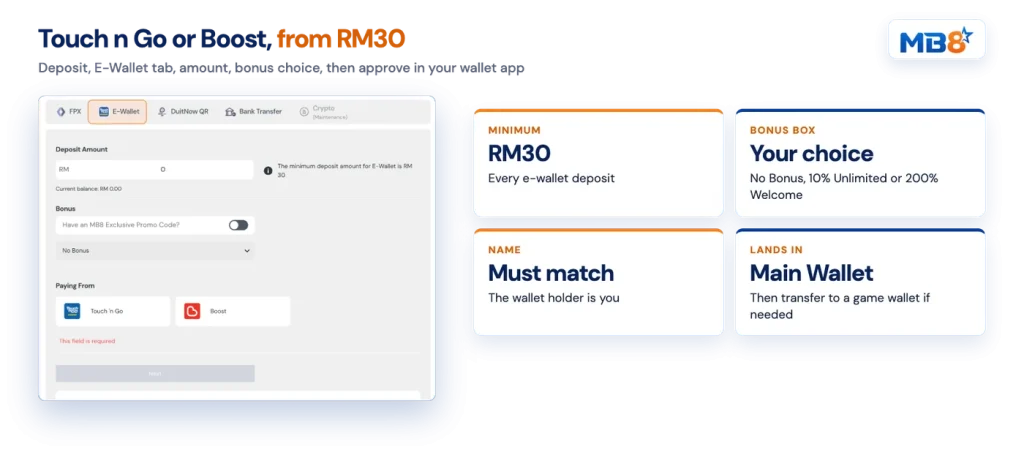
An MB8 e-wallet deposit needs three things: a logged-in account, at least RM30, and a Touch ‘n Go or Boost wallet holding enough to cover the amount. Everything else happens inside the cashier. You log in, press Deposit in the header, choose the tab that matches how you want to pay, and either approve the payment in your wallet app or complete it on the payment page. The money arrives in your Main Wallet, which is the balance withdrawals are paid from. Because the same RM30 floor applies to online banking, QR and bank transfer, the method you pick comes down to the account you already use.
Getting money out is a shorter list of rules, and they are the ones to know before you play. This page sets out all of them up front.
Five tabs sit inside the cashier, and four of them share the same RM30 minimum. No maximum deposit is published, so the ceiling is whatever your bank or wallet allows for a single transaction.
| Method | What you pay from | Minimum |
|---|---|---|
| FPX | 19 Malaysian banks through online banking | RM30 |
| E-Wallet | Touch ‘n Go or Boost | RM30 |
| DuitNow QR | Banking and e-wallet apps that scan DuitNow | RM30 |
| Bank Transfer | Your own bank account, with a receipt upload | RM30 |
| Crypto | Shown in the cashier and can be under maintenance | Shown in the cashier |
Treat crypto as conditional rather than guaranteed. The tab is there, but it can be marked under maintenance, and in that state no crypto deposit goes through. If that is your preferred rail, check the tab before you plan a session, so you are not left switching methods at the last minute.
The approval happens in a wallet app you are already signed in to, which keeps this route short on a phone.
One decision in that list deserves a pause. If you plan to withdraw soon, select No Bonus, because a withdrawal is not possible while a promotion is still active or its turnover is unmet. The arithmetic behind each offer, including the three-tier welcome bonus, is covered in the bonus turnover rules.
The DuitNow QR tab accepts payment from a range of banking and e-wallet apps, which is useful when your app is not one of the two listed wallets. The payment itself is handled by a payment processor partner, so follow the instructions shown on that payment page from start to finish.
Two habits matter here. Do not save the recipient account for reuse, and never pay without submitting a deposit request first, because a payment with no matching request has nothing to attach itself to.
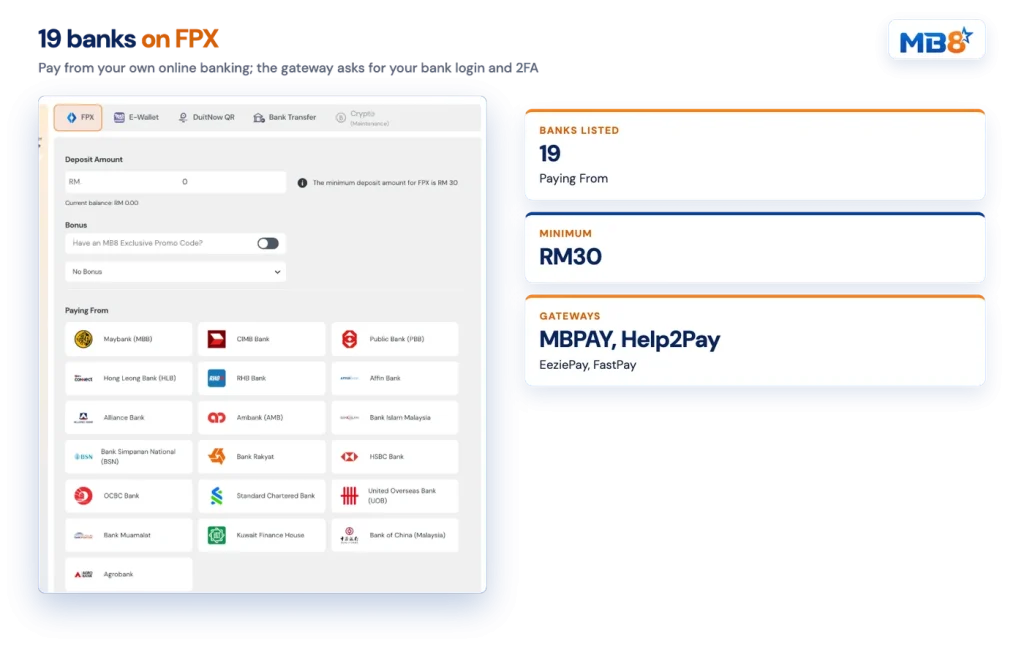
FPX is Malaysia’s online-banking payment rail, and it is the broadest option in our cashier with 19 banks under Paying From:
You authorise the transfer with your own banking credentials and your bank’s second factor, usually an SMS code or a hardware token. The payment gateways we work with include MBPAY, Help2Pay, EeziePay and FastPay. With a gateway you enter your bank username, password and 2FA on the gateway’s page, and the completed payment is reported back to the cashier.
Manual transfer takes a few more steps but works from any banking app. Select the bank shown in the cashier, note the account details displayed at that moment, and make the transfer for at least RM30. Screenshot the receipt, fill in the deposit form with the same amount you sent, and upload the image. The deposit is approved after verification and credited to your Main Wallet.
Always check the deposit account details before each transfer instead of relying on details you saved earlier. Money sent to our bank accounts also has to be claimed with a deposit form within one month, otherwise it is forfeited, so submit the form the same day you transfer.
Before you continue
Do not write the brand name, or the words Slots, Casino or Betting, or any other gambling term in the transfer reference field. Leave it blank or use a neutral reference.
Your money sits in two places. The Main Wallet is the account-level balance: deposits land there, and cash rebates and referral rewards are credited there. Withdrawals are also paid out of it.
Betting happens from a Game Wallet, one per game provider. If you open a provider and see Insufficient funds, the balance is usually still in the Main Wallet, so go to the Wallet page and transfer the amount across first. Promotions are likewise claimed after that transfer, through the Rewards page, where the offer applies to a provider wallet.
We are merging game wallets into the Main Wallet so that many providers need no transfer at all. The Main Wallet icon on the Wallet page shows which providers are already covered, and that is the list to trust before you start on any of the games in our lobby.
A few rules decide whether a payout request goes through. None of them are hidden, and all of them are easier to satisfy before you play than after.
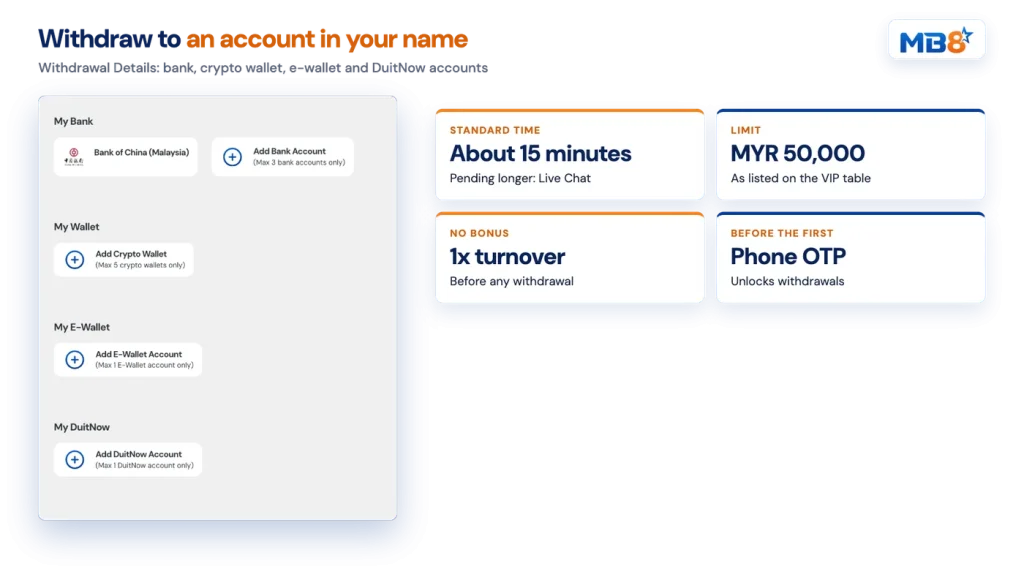
Even a deposit taken with No Bonus has to be turned over at least once before any withdrawal. Claim a promotion instead and its own turnover applies to deposit plus bonus, and no withdrawal is possible while that promotion is still running. Blackjack never counts toward turnover, and neither do draws, ties, rejected or invalid bets, or bets that cover both sides of the same market.
The account you withdraw to must carry the same name as the account you deposited from, and both must match the registered full name on your profile. That is also why third-party deposits from a friend or family member are refused. Keep one set of accounts in your own name across both directions and this rule never surfaces.
Withdrawals stay locked until your phone number is verified by OTP. Open your profile, press Request OTP, enter the code from the SMS and confirm. The same profile section handles verifying your phone number along with the other account details.
You can store up to three bank accounts, one e-wallet account, one DuitNow account and five crypto wallets under Withdrawal Details. The withdrawal count is unlimited on every tier, the withdrawal limit is listed as MYR 50,000 across the VIP table, and payouts are made in the currency you deposited in. The minimum withdrawal amount is shown in the cashier.
| Detail | MB8 |
|---|---|
| Minimum deposit | RM30 |
| E-wallets accepted | Touch ‘n Go, Boost |
| FPX banks listed | 19 |
| Standard withdrawal time | About 15 minutes |
| Withdrawal limit | MYR 50,000 as listed on the VIP table |
| Withdrawal count | Unlimited on every tier |
| Our deposit and withdrawal fees | None |
Standard processing runs at about 15 minutes. That figure depends on game providers returning your bet histories and on banks operating normally, so a quiet weekday behaves differently from a banking outage. If a request is still pending after 15 minutes, open Live Chat and ask for a status check rather than submitting a second request.
Unusual account activity can also trigger a document request. Identification and proof-of-age documents may be asked for, which is another argument for completing your profile details early instead of during a payout.
We charge nothing on either side, and the amount received is the amount credited. A bank, wallet or crypto network may still apply its own charge, and those are not absorbed, so check your provider’s own pricing for large transfers. Our terms also reserve the right to charge reasonable costs where they arise.
Verify your phone number, then keep every deposit and payout on an account in your own name. Both clear two of the reasons a withdrawal can be rejected.