en


To sign in, open the MB8 online login panel and enter the username and password you chose at registration. If you created the account through Google or Telegram, use that connected account instead and there is no password to type. The same MB8 slot login also opens the live dealer tables, the sportsbook and the fishing and crash lobbies. There is no separate e-wallet login either, because deposits, withdrawals and your payment details all sit inside the same member area.
Each member keeps one active account, so there is nothing to choose between. If your details are rejected, the password reset below is the quickest fix, and a forgotten username can be recovered through live chat, which runs 24 hours a day.
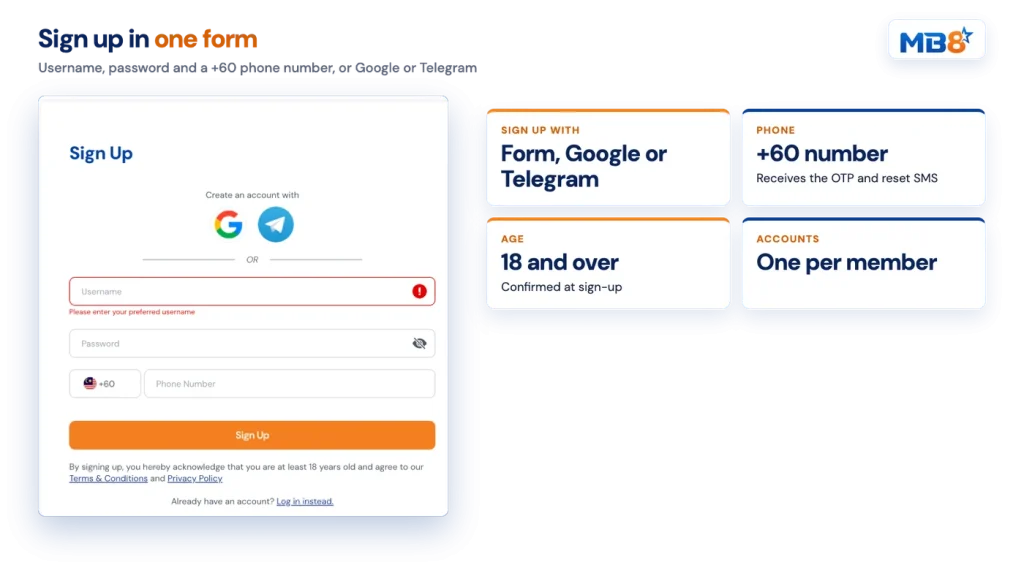
Registration asks for three things: a username, a password and a phone number with the +60 prefix. The alternative is one tap on Google or Telegram, which creates the account from an identity you already control. Either route confirms that you are at least 18 and that you accept the Terms and Conditions and the Privacy Policy.
Nothing forces you to finish steps two and three immediately, but leaving them undone is what holds up a first withdrawal. New accounts start as Classic membership, and the progress card in the lobby explains the next step: complete your profile and put through a deposit to reach VIP Bronze. From there the lobby is where the casino games lineup splits into slots, live tables, sports, poker and 4D.
Registration needs a username, a password and a mobile number that can receive SMS. Have your phone ready for the OTP so the withdrawal feature is active from day one.
Each access problem has one route.
| Problem | What to do |
|---|---|
| Forgotten password | Choose Forgot Password, then enter your phone number or username. A reset password is sent by SMS. |
| Reset SMS does not arrive | Request it again. If it still does not come through, contact Live Chat. |
| Forgotten username | Contact Live Chat. |
| Your details are already in use on another account | Contact Live Chat. |
| You know the password but want a new one | Use Change Password in the member area. |
Because the reset is delivered by SMS, the number on your profile has to be one you still use. Keep it current, and remember that a phone number change is handled by Support rather than edited freely in the form. Support is also the route if your personal details come back as already registered.
Confirming your number secures the account and unlocks the withdrawal feature. Press Request OTP, enter the code from the SMS, then press Verify. Until that is done, you can deposit and play, but a payout request has nowhere to go.
Two related rules sit on the money side of the account, and both are easier to handle before you win than after. A deposit made without a bonus still needs 1x turnover before it can be withdrawn. And the bank, e-wallet or DuitNow account you withdraw to must carry the same name as the account you deposited from. If you want the detail on rails, banks and minimums, making your first deposit is covered separately.
Keep in mind
An OTP code is for you alone. Never read one out, forward it or type it into a chat window, whoever asks for it.
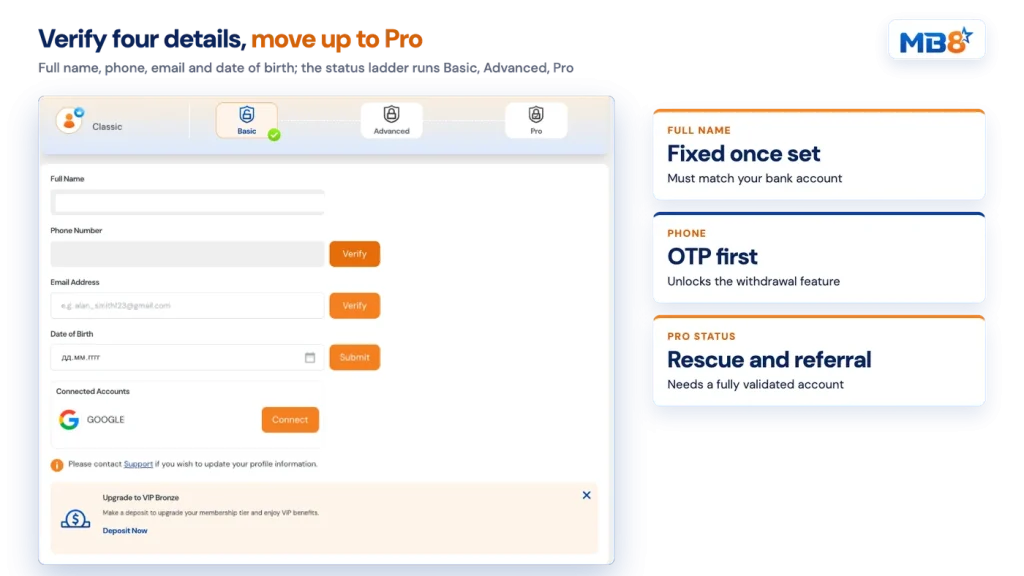
My Account holds four details that matter more than they look. Full Name is fixed once it has been set, so enter it exactly as it appears on the bank account or e-wallet you intend to pay with. Phone Number and Email Address each have their own Verify button. Date of Birth is submitted once, and it is the field the VIP Birthday Bonus reads, so a wrong entry costs you that benefit. Connected Accounts is where a Google login can be linked. Anything else on the profile is changed through Support.
Before you continue
The full name on your account must match the bank or e-wallet account you pay with. A mismatch between the deposit name, the withdrawal name and the registered name is one of the few reasons a payout gets rejected, and third-party deposits from a friend or family member are not accepted at all.
The top of the profile shows an account status ladder: Basic, Advanced, Pro. It moves as you verify the four details above, and the promotions describe an account with Full Name, Phone Number, Email Address and Date of Birth all verified as fully validated. That is the state the verification reward and the promotion opt-ins look for.
Status is not decoration. Pro is the condition attached to the Weekly Rescue Bonus and to the Refer A Friend page in the member area, so a half-finished profile keeps two features out of reach. The identity and age documents named in the terms can also be requested at any point, which is far less disruptive to handle when your details are already in order.
Account security here is ordinary discipline rather than anything technical.
MB8 casino login on a phone uses the same credentials as on a computer. The lobby, the cashier, the member area and live chat all run in the phone browser, so you sign in exactly as you would on a desktop and land on the same balance and the same wallets. If you want the icon on your home screen and a word on why files from unknown sites are a bad idea, start with playing on your phone.